Showing posts with label Tips and Tricks. Show all posts

How to install Windows 8 on VMware workasation?[step by step]

By Akshay   Posted at  11:23 PM   windows8 No comments
As i given u the download links of Windows 8 preview version in my previous post 
       
Here comes the Step by Step process for installing on VMWare 


Change Windows 7 Login image automatically

By Akshay   Posted at  10:59 PM   Windows Tips No comments
If you are kind of person who like to customize windows 7 a lot then you gonna love Windows 7 Login changer which rotates images displayed  when you get on the login page.  But if you have Auto Login or have not created password for your account, you would not be able to see the change.
Well its working fine!!!!
Download
Main Website: HERE
Download ZIP: HERE
Download RAR: HERE 

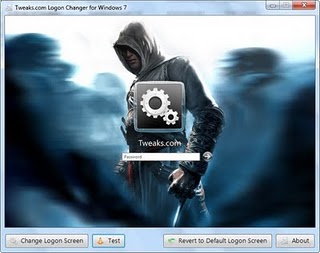
Logon Screen Changer for Windows7[NEW]

By Akshay   Posted at  10:50 PM   Windows Tips No comments
Hello guys,
     After a long days,writing a post on How to change Logon Screen changer in windows7


Now start playing Games in Google plus too :P

By Akshay   Posted at  8:35 PM   Tips and Tricks No comments
Now google plus is becoming more attractive as it is giving new features like gaming online just like facebook.So there`s a huge competition among G+ and FB .

G+ got a new step beyond by adding online gaming features.It just added a new tab in your G+ home page.
You can priview it here
Or you can go here gor Google games https://plus.google.com/games


  Google plus wont spam anyone because it asks everything before posting to wall. Its same like facebook game apps
because it gives all the notifications on ur games like requests,high scores,gifts,....
                                                                                                   Akshay

Facebook new Smiley(Like emoticon)

By Akshay   Posted at  5:20 PM   Tips and Tricks No comments
Facebook has added a new smiley since a long...The like emoticon is the most famous feature in FB.and Orkut too copied it.
     
Now this like button picture  arrived as a chat smiley too.
To view the Like Emoticon on Fb chat


 Just type
 
           ------->           (Y)


It is Previewed as
       

A brief notes on Google dorks

By Akshay   Posted at  9:22 PM   Tips and Tricks No comments

A few things you might want to try with Google:
                               

Hand type the following prefixes and note their utility:


link:url          Shows other pages with links to that url.

related:         url same as "what's related" on serps.

site:domain    restricts search results to the given domain.

allinurl:          shows only pages with all terms in the url.

inurl: like        allinurl, but only for the next query word.

allintitle:          shows only results with terms in title.

intitle:             similar to allintitle, but only for the next word. "intitle:webmasterworld google" finds only pages with webmasterworld in the title, and google anywhere on the page.

cache:             url will show the Google version of the passed url.

info:                url will show a page containing links to related searches, backlinks, and pages containing the url. This is the same as typing the url into the search box.

spell:             will spell check your query and search for it.

stocks:          will lookup the search query in a stock index.

filetype:          will restrict searches to that filetype. "-filetype:doc" to remove Microsoft word files.

daterange:       is supported in Julian date format only. 2452384 is an example of a Julian date.

maps:             If you enter a street address, a link to Yahoo Maps and to MapBlast will be presented.

phone:             enter anything that looks like a phone number to have a name and address displayed. Same is true for something that looks like an address (include a name and zip code)

site:                     www.somesite.net "+www.somesite.+net"
(tells you how many pages of your site are indexed by google)

allintext:            searches only within text of pages, but not in the links or page title

allinlinks:          searches only within links, not text or title


I hope there is something new in here for you and maybe this info`s will be helpfull for you.....

Quick tips: how to search for music on Google :)

By Akshay   Posted at  9:05 PM   Tips and Tricks No comments

Great Tip For Mp3 Searching On Google,
                                                 
go to google copy and paste in

?intitle:index.of? mp3


and after mp3 put in an artist or album or whatever and hit enter...
  And here what you get is lists of downloadable mp3s

eg:


?intitle:index.of? mp3 enrique


Another trick:

Use the following


inurl:microsoft filetype:iso


You can change the string to watever you want, ex. microsoft to adobe, iso to zip etc…


Have fun ..bye guyzzz :Akshay

How to RENEW your IP address manually?

By Akshay   Posted at  11:37 AM   Tips and Tricks No comments
Its very easy to renew your IP address manually through your Command Prompt.. :D

 How to change IP address???


1. click START


2. click RUN ( otherwise press windowkey + R)


3.Type cmd.exe and press OK


4.Then enter the following commands in each line by pressing enter after every command


               ipconfig /flushdns
               ipconfig /release
               ipconfig /renew
               exit


5. Erase your cookies in whatever browser you are using.
                     
Frequently you will be assigned a new IP address when this happens. Sometime you will, sometimes you will not. If you are on a fixed IP address, this method will not work. If this works for you, you may want to save the above commands into a batch file, and just run it when you need it. 


Facebook new feature like circles in google plus :P

By Akshay   Posted at  2:01 PM   Tips and Tricks No comments
Google+ introduced the concept of using circles to organise friends to various groups.Now a new facebook application named Circle Hack has applied this feature.It provides graphical interface like google+ circles with the Drag and drop feature.In google+ you can control who can see your update using the circles but in facebook this function cannot be performed by Circle hack instead you have to Control these settings from Privacy settings.           
So, this Circle hack is nothing more than a convenient way to organise your friends in facebook group
Quite interesting???check it once------>
Technozoen.com
How to install circle hack in your facebook profile??
  • Login into your Facebook Account
  • Now Open Facebook Circle Hack.
  • Click on the Login Button.It will ask you to grant permissions.
  • After Granting permission by click on Allow button you can see all your friends in the upper half of screen and circles at the bottom half.
  • Now you can create new groups by clicking on the Create List in the first circle.
  • After creating a group Drag and drop your friends from the upper half of the screen
  •  If u have any comments pls mention :D
                                        

How to Activate Facebook Video Chat??

By Akshay   Posted at  8:21 PM   Tips and Tricks No comments
Facebook has launched the video chat for its users from June 6th 2011.But this feature is not available in the profile by default,just you have to enable it!!!! This process is simple to enable try it--->

How to enable facebook video chat??
                                                                 
    Initially go to the below link :
         
                   https://www.facebook.com/videocalling
 Now a facebook page opens like this
Click this Get Started button

Now it downloads and install some required plugin  and thats it the process is done......

Now Let us know how to use the videochat option :
   To use the videochat the other person should also need to enable this feature,otherwise it cant be done :(

So now select any online friend and from the chatbox,click the video button..
Otherwise go to their profile where you see the call button,and  then use the video chat feature...
This came into existence because google started google plus ,so fb integrated with skype as their media partner..
          
                                       Urs friend  Akshay


Google + Cheat Codes

By Akshay   Posted at  9:18 PM   Tips and Tricks No comments
Google Plus is a new and finest socail networking portal.:) The Google+ project makes sharing on the web feel like sharing in real life.
Still its a beta versioned program inviting only some of the people,but this gonna be a simplest & best project!!!


So here are these some of the new cheats and keyboard shortcuts for google+ ,have a great look guys!!!


       Keyboard Shortcuts:       


                  Type your text and these some characters------>


  • Bold  * WORD * = WORD
  • Italic _WORD_ =  WORD
  • Strikethrough -WORD- = WORD

 TRICKS:
  • Drag & Drop link, photo’s or videos at the Post directly will add the items
  • Circles are like you following someone on Twitter, they might not follow you back but their posts will come on your stream
  • Mention People in your post by adding + or @ sign in front the name
  • Clicking the Timestamp on the post will display the post with the Permanent Link


  •  So Enjoy the new feature of Google plus  :-)
                                          Yours Akshay


Disable Right click on Your webpage/blogger[how to]

By Akshay   Posted at  1:13 PM   Tips and Tricks No comments
Hello friends...
  Now you can disable the Right click on ur webpage/blog easily with a single javacript--->
To block people from copying text or image from your blogger posts you need to disable right click. And in order to do this, you need to add a code to your bllog.Follow the below steps.


Try right-clicking on this page as an example.

See the following link for the code-->http://pastebin.com/X9q3VqKm

Place the above code into < HEAD> < /HEAD> of your HTML.( remove spaces b/w head and <
Now no one can steal your contents as you have disabled right clicking on yorur blogger  
            But still I would like to advise you not to do this. It might affect innocent people from copying some necessary codes from your blog. You can deal with those people who steals your content in a legal way...

5 Best Firefox addons to be anonymous online

By Akshay   Posted at  1:03 PM   Tips and Tricks No comments

Firefox is fast,reliable and secure browser that provides a lot of different features except browsing. So this article will talk about anonymous surfing via Firefox.Mostly people use different software's and online services to achieve anonymous surfing, however you can add some plug ins on your Firefox browser to achieve this task.

Below are the list of some add ons that will provides highly anonymous surfing.


FoxyProxy is the most famous and widely used extension that provides highly anonymous surfing. FoxyProxy is an advanced proxy management tool that completely replaces Firefox's limited proxying capabilities. It also offer reliable, high-bandwidth proxy servers in 24 different countries. You can use foxyproxy to bypass content filtering in your work place.


Tor project is a big invention in the world of online privacy protection, tor offers different services and software's to achieve anonymous surfing.Torbutton provides a button to securely and easily enable or disable the browser's use of Tor. It is currently the only addon that will safely manage your Tor browsing to prevent IP address leakage, cookie leakage, and general privacy attacks.


If you are concern about your online privacy and if you want to become complete anonymous so Autoproxy will help you. With AutoProxy, you no longer need to switch your proxy status between on & off manually. If you prefer to visit a website via proxy, just add it's domain to AutoProxy's preference


AWB proxy is a fast and reliable extension that provides UK anonymous proxy server, it hides your real IP and it protects your information means privacy protection.
Proxy tool manager provides a power full and user friendly environment, it provides 10 different spoofed HTTP referrers, auto-proxy rotation etc. You can delete all the cookies manually or automatically, it provides a feature to import more proxyserver on the tool.


Check any website when is it lastly updated???

By Akshay   Posted at  8:03 PM   Tips and Tricks No comments
Hi Guys!!!!!It is very needed that when the website is updated that means whether a new post or any updated content,U can check though this small javascript hack!!! Try this ,its very cool :-)


Steps :-

1.) Open your favorite website eg: http://akshaykitswgl.com,  facebook.com ,  google.com etc


2.) Go to address bar where you have to type the URL (website link)

3.) Copy & paste this java script code

4.) javascript:alert(document.lastModified);

5.) You can get a Popout MessageBox with last modified date and time

6.) Done
                                                thanks for viewing......
                                                                        Akshay

Now You can send SMS without Registration..

By Akshay   Posted at  8:44 PM   Tips and Tricks No comments
There are a lot of websites in india on the Internet that provides free sms services but only some of them allows you to send Sms without registration and anonymously. Here u can see the 4 best websites through which we can send unlimited sms.
1. Smsti.in

Smsti.in allows you send message of complete 160 words and without any ads. There message service is very fast and you can even check the delivery reports of the sms that has been sent.

They provide their sms services for Indian Mobile numbers only.

2. Seasms.com

Seasms allows you to send messages all over the world. This is the only free sms service that I found which all allows you to send worldwide messages anonymously.

They also provide 160 character support for SMS.


3. Spicesms.com

Spicesms allows you to send sms only in India with 130 character support for sms. Their service is very fast and sms are delivered instantaneously.

4. Bollywoodmotion

Bollywoodmotion is one of the best sms website as you can send sms up to 500 characters long.

They do not include any ads into your message and messages are delivered in real time.This service is available only for Indian mobile numbers

If you know any other sms services that allows you to send messages without registration then do share with us by commenting.

Compress any movie(700mb) to 300mb

By Akshay   Posted at  4:04 PM   Tips and Tricks 2 comments
Hello friends,me akshay back again with a nice tutorial.lets see....
        In this tutorial I'm going to explain how to encode movies with MeGUI,
First your going to need a good source for your movie your wanting to encode,
Anything in the 700Mb xViD encoded range should be good...


SOFTWARES NEEDED


1) AVISYNTH_257

Download


2)MeGUI

Download


3)NERO AAC ( AUDIO CODEC)

Download


Install MeGUI run it and get it fully updated.


Install AviSynth, Then your going to need Nero AAC (Audio Codec) its excellent for compression,


Install Nero ACC executable files in the MeGUI folder which is;


#/Program files/meGUI


Restart your PC,


Start up MeGUI once its loaded press "CTRL+R", That will open "AVISynth Script Creator"


[Image: ogaaahhe2u6lol01mezldw7.jpg]


1. Select the source movie you want to encode.

2. Make sure "Resize" Is UNTICKED.

3. Click save and save the script.


[Image: ogaaapmprotkwjuqgu7b5zr.jpg]


1. The AVS file you just made should already be selected if not then select it.

2. If the OUTPUT of the encoded file isn't pre defined define it now.

3. Make sure the Codec is set at "x264"

4. Make sure "MKV" is selected as the file container.
5. Select "HQ-Slower" as the video profile.
6. Select the original video source as the audio input.
7. If the audio output isn't yet defined define it now.
8. Select "NDAAC-HE-64Kbps" as the audio profile it provides perfect compression to bitrate ratio.
9. Select "ND AAC" as the codec
10. Select "MP4-AAC" as the audio extension.
11. Press "AutoEncode.


[Image: ogaaancaqp7cyuafaxbmjl5.jpg]


1. Select the container as "MKV"

2. Define your desired output of the encoded movie

3. Make sure the file size radio button is selected, And define the file size as 300MB or 400MB depending


on the length of the movie (Try to get the bitrate at 450ish)

4. Select "Queue"

5. Go to the Queue tab once your back on the main MeGUI page and select "Start down the bottum, It will ask

if you want to create a worker, Create one.


Thats it friends U r done!!!

Back to top ↑
Connect with Us

What they says

Hi.Iam A 19 Years guy doing CEH & CHFI. I Like To Share My Ideas & Views About HACKING Because i Think That Everyone Should Know About It So That They Can Save Them Self From CRACKERS. "NO ONE CAN SAY AM A HACKER, WE ARE THE HACKERS" HACKING IS NOT CRIME IT's OWN PASSION. BUT ONE CAN USE OF IT FOR GOOD PURPOSE ALSO.
© 2013 AKSHAY. WP Mythemeshop Converted by BloggerTheme9
Blogger templates. | Distributed by Rocking Templates Proudly Powered by Blogger.