Showing posts with label Windows Tips. Show all posts

Change Windows 7 Login image automatically

By Akshay   Posted at  10:59 PM   Windows Tips No comments
If you are kind of person who like to customize windows 7 a lot then you gonna love Windows 7 Login changer which rotates images displayed  when you get on the login page.  But if you have Auto Login or have not created password for your account, you would not be able to see the change.
Well its working fine!!!!
Download
Main Website: HERE
Download ZIP: HERE
Download RAR: HERE 

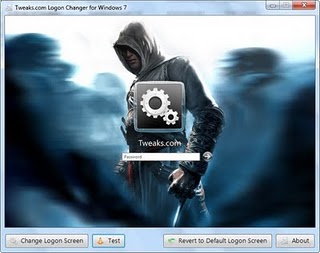
Logon Screen Changer for Windows7[NEW]

By Akshay   Posted at  10:50 PM   Windows Tips No comments
Hello guys,
     After a long days,writing a post on How to change Logon Screen changer in windows7


How to customize Your RUN Dialogue box??

By Akshay   Posted at  3:43 PM   Windows Tips No comments
Use resource hacker to customize your computer, specifically the run dialog box. Make your computer as cool as you, and learn something in the process. :]

Note: I can only validate these directions for Windows XP... but you can try others.


[Image: GW300H178]

Hack Admin Password Through A Guest Account!!!!

By Akshay   Posted at  8:51 PM   Windows Tips No comments
Hack admin password from guest account 


* Go to C:/windows/system32
* Copy cmd.exe and paste it on desktop
* Rename cmd.exe to sethc.exe
* Copy the new sethc.exe to system 32,when windows asks for overwriting the file,then click yes.
When asked to overwrite,overwrite the sethc.exe
* Now log ut from your guest account and at the user select window,press shift key 5 times.
* Instead of sticky Key confirmation dialog,command prompt with full administrator privileges will open.
* Now type “ NET USER ADMINISTRATOR aaa” where “aaa” can be any password you like and press enter.
* You will see “ The command completed successfully” and then exit the command prompt and login into administrator with your new password.
* Congrats You have hacked admin from guest account.

             Source:myhackingway                                                              

How to hide a FILE in an IMAGE(without any software)?

By Akshay   Posted at  7:29 PM   Windows Tips No comments
 Can We Hide The File In Image?
                                               Yes U can................


1. Gather the file you wish to bind, and the image file, and place them in a folder. I will be using C:\New Folder

-The image will hereby be referred to in all examples as xyz.jpg
-The file will hereby be referred to in all examples as New Text Document.txt

2. Add the file/files you will be injecting into the image into a WinRar .rar or .zip. From here on this will be referred to as (secret.rar)

3. Open command prompt by going to Start > Run > cmd

4. In Command Prompt, navigate to the folder where your two files are by typing
cd location [ex: cd C:\New Folder]

5. Type [copy /b xyz.jpg + secret.rar xyz.jpg] (remove the brackets)

Congrats, as far as anyone viewing is concerned, this file looks like a JPEG, acts like a JPEG, and is a JPEG, yet it now contains your file.

In order to view/extract your file, there are two options that you can take

a) Change the file extension from xyz.jpg to xyz.rar, then open and your file is there
b) Leave the file extension as is, right click, open with WinRar and your file is there

EnJoy HacKinG...
                                                                                 ..........Akshay

How to hide files in JPEG images

By Akshay   Posted at  6:31 PM   Windows Tips No comments

Hide File in Picture

In order to accomplish this task, you will need to have either WinZip or WinRAR installed on your computer. You can download either of these two off the Internet and use them without having to pay anything. Here are the steps for creating your hidden stash:
  • Create a folder on your hard drive, i.e. C:\Test and put in all of the files that you want to hide into that folder. Also, place the image that you will be using to hide the files in.

Photoshop Text Effect [TUTORIALS]

By Akshay   Posted at  12:09 PM   Windows Tips 1 comment

Stunning Liquid Text Effect

Stunning Liquid Text EffectWith this tutorial you will take a look at how to use liquid photostocks to create the gorgeous and stunning liquid text effect can see in the screenshot above. Using some clever techniques, you will learn how-to warp liquids into a variety of shapes and how to create letters from liquids, and then add in some extra effects for a dynamic composition.

How to Protect your Computer from KEYLOGGERS

By Akshay   Posted at  6:12 PM   Windows Tips No comments
Protect from KeyloggersKeyloggers have been a major problem today as it does not require any prior knowledge of computers to use it. So hackers mainly use keyloggers to steal your passwords, credit card numbers and other confidential data.
Below are some methods through which you can protect your computer from keyloggers:
 

Use a Good Antivirus

This is the first and basic step that you need to take in order to protect your computer from keyloggers. Use a Good antivirus such as Kaspersky, Norton or Mcafee and update it regularly.

Boost your Bittorrent Speed & Privacy

By Akshay   Posted at  6:01 PM   Windows Tips No comments
BitTorrent's been around for a whopping ten years, but it continues to evolve and remains one of the best file-sharing tools available. If you really want to make your downloads soar—and keep Big Brother out of your business—this guide's for you.
We showed you how to get started sharing and downloading files with BitTorrent a few years ago, and most of that still applies, but if you're looking to up your BitTorrent skills, things have changed a lot since then.

Code to remove CPA lead & others SURVEYS

By Akshay   Posted at  12:15 PM   Windows Tips No comments
Hello everyone!
Welcome to my tutorial how to remove CPALead surveys!
1.Find a website that requires CPALead survey!
Example:
http://www.youserials.com/serial/windows-7/187103

2.In address bar of your browser,Copy/Paste code that is written down.

 
Hope that Helps!!!

Web Media Player Applications

By Akshay   Posted at  4:11 PM   Windows Tips No comments
Free Media Players (Free MP3, Video, and Music Player ...) are cool because they let web developers and bloggers embed MP3 Players/FLV Olayers and build customized JukeBox on the websites. With these online Media players, you can add a list of songs easily and embed the given Javascript code to your website. Most of these players are customizable and you can have your won skin that suit the web design

How To Recover Deleted Files From Windows & Mac

By Akshay   Posted at  5:19 PM   Windows Tips No comments

How to Recover Deleted Files

Have you accidentally deleted your files from the Hard disk? Do you desperately want to recover them back? Well you need not panic! It is possible to recover the deleted files back from the hard disk  (even after you have Shift+Deleted)  provided you act as soon as you realize that the files are deleted and use the best deleted files recovery software. In this post you will find a detailed information on how to recover the deleted files from your Windows PC or Mac.

LOCK YOUR PC WTH USB DRIVE

By Akshay   Posted at  4:37 PM   Windows Tips No comments


TIP TO SCAN & REPLACE WINDOWS CORRUPTED SYSTEM FILES

By Akshay   Posted at  4:27 PM   Windows Tips No comments
If your computer running slowly or not working properly then there may be some problem in its System files. System files are group of program files that work together to run your computer. These files can be changed or corrupted with time, it may corrupts due to installation of softwares, some internal errors or due to viruses, which makes computer slower.

Back to top ↑
Connect with Us

What they says

Hi.Iam A 19 Years guy doing CEH & CHFI. I Like To Share My Ideas & Views About HACKING Because i Think That Everyone Should Know About It So That They Can Save Them Self From CRACKERS. "NO ONE CAN SAY AM A HACKER, WE ARE THE HACKERS" HACKING IS NOT CRIME IT's OWN PASSION. BUT ONE CAN USE OF IT FOR GOOD PURPOSE ALSO.
© 2013 AKSHAY. WP Mythemeshop Converted by BloggerTheme9
Blogger templates. | Distributed by Rocking Templates Proudly Powered by Blogger.